

Shopware 6 gives you a checkout you can shape around your customers, but payments still arrive one extension at a time: one for cards, one for instalments, one for invoice, each with its own settings, its own transaction states and its own compatibility to check at every Shopware update.
Briqpay for Shopware replaces that stack with a single, open source plugin. Shoppers see every payment method embedded in the native checkout, business buyers get invoice and payment terms without a separate flow, and you capture, refund and cancel line by line from the order page you already use. Which methods appear in which market is a rule in the Briqpay portal, not another plugin install.
Shopware merchants tend to hit the same four payment problems as they grow:
Briqpay solves this.
One Shopware plugin gives you a payment layer you control. Connect the providers you want, decide which methods each customer sees, and manage every order from Shopware. Adding a provider later is configuration in the Briqpay portal, not a new plugin.
The plugin renders Briqpay on Shopware's checkout confirm page. Cart, sign in and shipping stay exactly as they are; at the payment step the Briqpay checkout is embedded below the product table, presents every method you have enabled, and completes the purchase inside it. No redirect, no separate checkout page, and your theme is untouched.
Validation happens server-side at Briqpay's decision step, the pause after the shopper presses pay but before any money moves. The plugin confirms the session belongs to this shopper's cart, that the cart is not empty and that the total still matches, and rejects with a reason shown in the checkout if not. Because the checks run on your server they cannot be bypassed by editing the page. The session is kept in step with the cart automatically, re-syncing when the address, shipping method, currency or cart changes.
Running headless? The Briqpay session and the snippet that mounts the checkout are exposed on the cart through the Store API, and the plugin carries a redirect URL through so the shopper lands back on your own frontend after payment.
A customer with a business account, or a company name on the billing address, gets a business session with invoice and payment terms available. Everyone else gets consumer methods. The VAT ID Shopware already holds is passed along, and switching between the two starts a fresh session so the right methods are always shown. Nothing to configure per customer group.
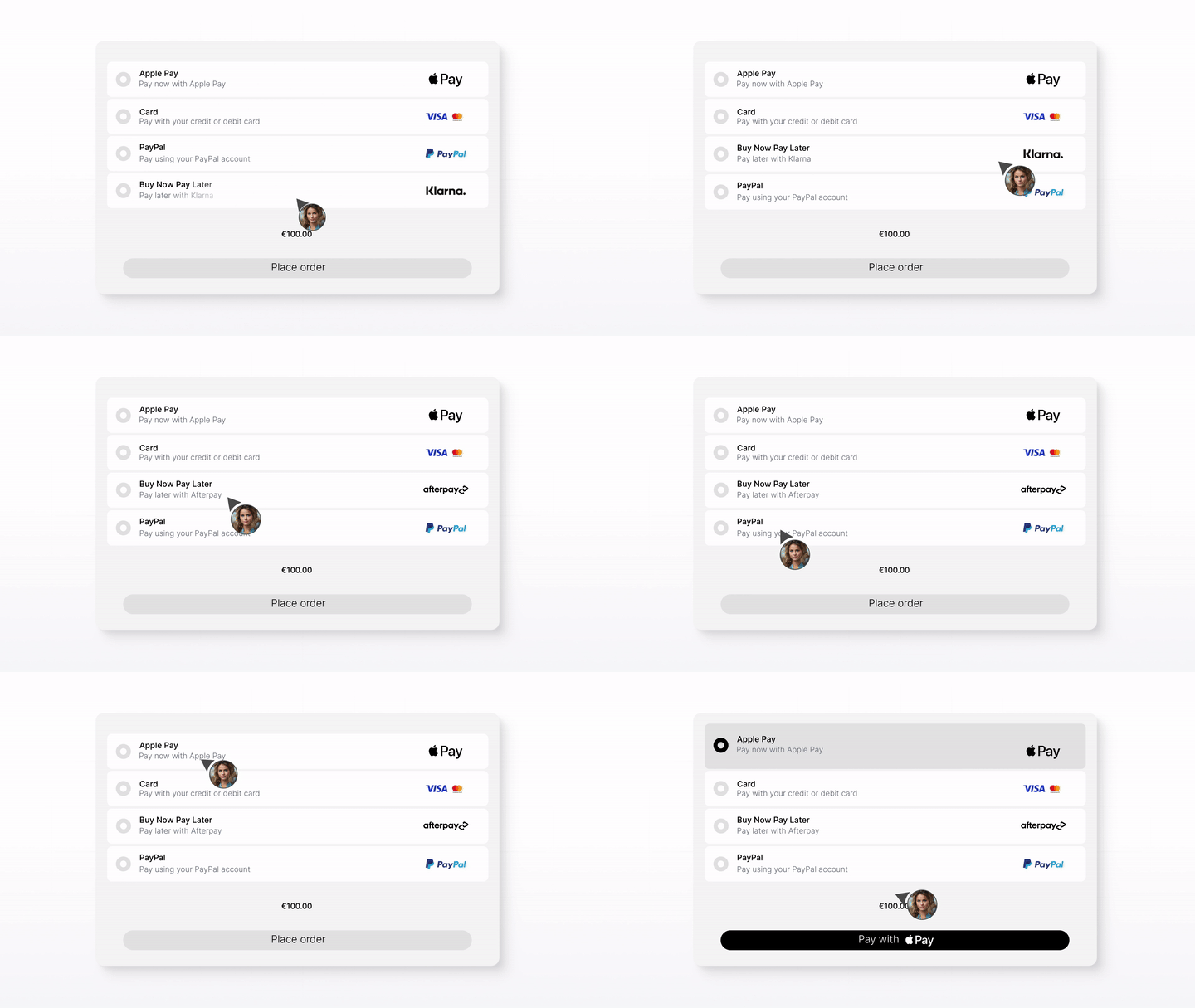
The market follows the customer, not the sales channel: country comes from the billing address, currency and language from the active context. One sales channel selling into several countries shows each customer their local methods without per-market setup.
Capture, refund and cancel live in a Briqpay card on the Shopware order detail page, and every action is also available through the admin API for scripting.
| Action | How it works |
|---|---|
| Capture | Opens a modal listing every order line with remaining quantities pre-filled. Adjust quantities for a partial capture. |
| Refund | Targets a specific capture and lists its lines. Cannot exceed what that capture still holds. |
| Cancel | Releases the authorisation while nothing has been captured. Once anything is captured, refund instead. |
Nothing is offered until Briqpay has approved the order, and every capture, refund and cancellation is recorded locally with running totals, so the card always shows where the money is. Captures or refunds made in the Briqpay dashboard, or by a provider that captures on authorisation, are picked up by webhook and recorded in the same ledger. Orders flagged for manual review are parked in a dedicated state until a human or a follow-up webhook moves them on. The order records the payment method the shopper actually used, not a generic label.
Amounts are handled the way Shopware prices them: gross, line by line, in minor units, so a cart of awkward prices, a percentage discount and a paid shipping line reconciles to the cent between the Shopware order and the Briqpay session.
Create the order in the administration as usual, open the Briqpay Payment Link card and click Create payment link. The customer gets a hosted payment page titled with the order number, with the order lines and the addresses already filled in. When they pay, the existing order moves to its paid state; no second order is created, and a link cannot be created once the order is paid, so a customer is never charged twice. The same card also works for re-payment when a first attempt with another method failed.
The plugin is free, open source (MIT) and published on GitHub with a unit test suite and CI:
Install in four steps:
Activation registers a Briqpay payment method on every sales channel. The compiled administration bundle ships inside the plugin, so no Node toolchain is needed. Webhooks are registered automatically for order, capture and refund status changes, deduplicated and locked per session so concurrent deliveries cannot create two orders, and a scheduled reconciliation task fails abandoned checkouts after five hours. Two Symfony events let your developers adjust the session payload or the decision without forking the plugin.
View the plugin on GitHub · Read the plugin documentation · Briqpay API documentation
Running another platform as well? The same Briqpay payment layer sits behind our Magento 2, PrestaShop, WooCommerce and commercetools integrations, and every method in our payment method library is available through it. For the thinking behind a single payment layer, see what actually reduces checkout costs and cart abandonment and our study of B2B checkout speed.
Cards, invoice, direct bank, wallets, BNPL and B2B payment terms from the providers you choose, all through a single Shopware 6 plugin. Adding a provider later is configuration, not another extension.
Briqpay renders on Shopware's confirm page below the product table. Cart, login and shipping stay in Shopware; every payment method appears inside the checkout with no redirect. Store API supported for headless setups.
A business account or a company name on the billing address opens a business session with invoice and payment terms, VAT ID included. Consumers get cards, wallets and instalments. One sales channel, both audiences.
Rules in the Briqpay portal decide which methods each customer sees, and in what order, by country, currency, cart value, category or customer type. Localize and optimize without a Shopware release.
Partial capture by quantity, refunds against a specific capture, cancel while nothing is captured. Guarded server-side, recorded with running totals, and kept in sync with anything done in the Briqpay dashboard.
Send hosted payment pages for phone, email and re-payment orders straight from the order page. The plugin is free under the MIT licence on GitHub, with tests, CI and two developer events.
STEP 01
Download BriqpayPayments.zip from the latest GitHub release, upload it in Extensions, then enter your Client ID and Client Secret. Shopware 6.6, PHP 8.2 or newer. No Node toolchain required.
STEP 02
Sign directly with the payment providers you want. Briqpay connects them behind the one plugin you already installed, so nothing changes in Shopware when a provider is added.
STEP 03
In the Briqpay portal, decide which methods appear per country, currency, cart value and customer type. Country follows the customer's billing address, so one sales channel can serve many markets.
STEP 04
Complete a playground purchase, switch Test mode off, and manage orders from Shopware. Add markets and methods as you grow, without new integrations.
Whether you’re integrating for the first time or switching providers, Briqpay helps you go live quickly, stay in control, and scale smarter across markets
Free and open source. Get the latest release from GitHub and be live in your Shopware checkout in an afternoon. Download from GitHub
Settings, order management, payment links, webhooks, Store API and developer events are documented in the plugin README. The Briqpay API docs cover everything behind it.
Get expert help tailored to your needs, from payment strategy to technical setup. Contact us at integrations@briqpay.com
Shopware 6.6.x on PHP 8.2 to 8.5. The plugin is tested in CI, ships its compiled administration bundle, and uses standard Shopware migrations, so it installs without a build step.
Yes. Briqpay for Shopware is open source under the MIT licence and free to download from GitHub. You need a Briqpay merchant account to use it; commercial terms for Briqpay's platform and for your payment providers are separate from the plugin.
Card, invoice, direct bank transfer, digital wallets, buy now pay later and B2B payment terms, from any provider connected to Briqpay. Which methods a customer sees depends on the country, currency and language of the session and the rules you set in the Briqpay portal. See our payment method library for what is available per market.
No. Cart, login, addresses and shipping stay in Shopware's native checkout. On the confirm page the Briqpay checkout is embedded below the product table and completes the purchase; there is no redirect and no separate checkout page. Headless storefronts get the same session through the Store API.
Yes. A business account or a company name on the billing address opens a business session with invoice and payment terms, with the customer's VAT ID passed along. Other customers get consumer methods. Both run from the same sales channel with nothing to configure per customer group.
From the Briqpay card on the order detail page, line by line. Capture pre-fills remaining quantities for partial captures, refunds target a specific capture, and cancel releases the authorisation while nothing has been captured. Every action is also available via the admin API, and anything done in the Briqpay dashboard is reflected on the order.
Yes. Create the order in the administration, open the Briqpay Payment Link card and click Create payment link. The customer pays on a hosted page pre-filled with the order lines and addresses, and the existing order moves to paid. Links cannot be created once an order is paid, so nobody is charged twice.
You sign directly with your chosen payment providers, while Briqpay provides the integration and orchestration platform. Briqpay does not handle funds or financial agreements, so you keep the commercial terms and can add or switch providers without a new integration.
Connect any payment provider. Optimize your payment flow. Scale without limitations - with Briqpay’s Payment Integration Platform.
