
More insights

Co-founder, Chief Executive Officer
August 24, 2026 at 08:00 AM
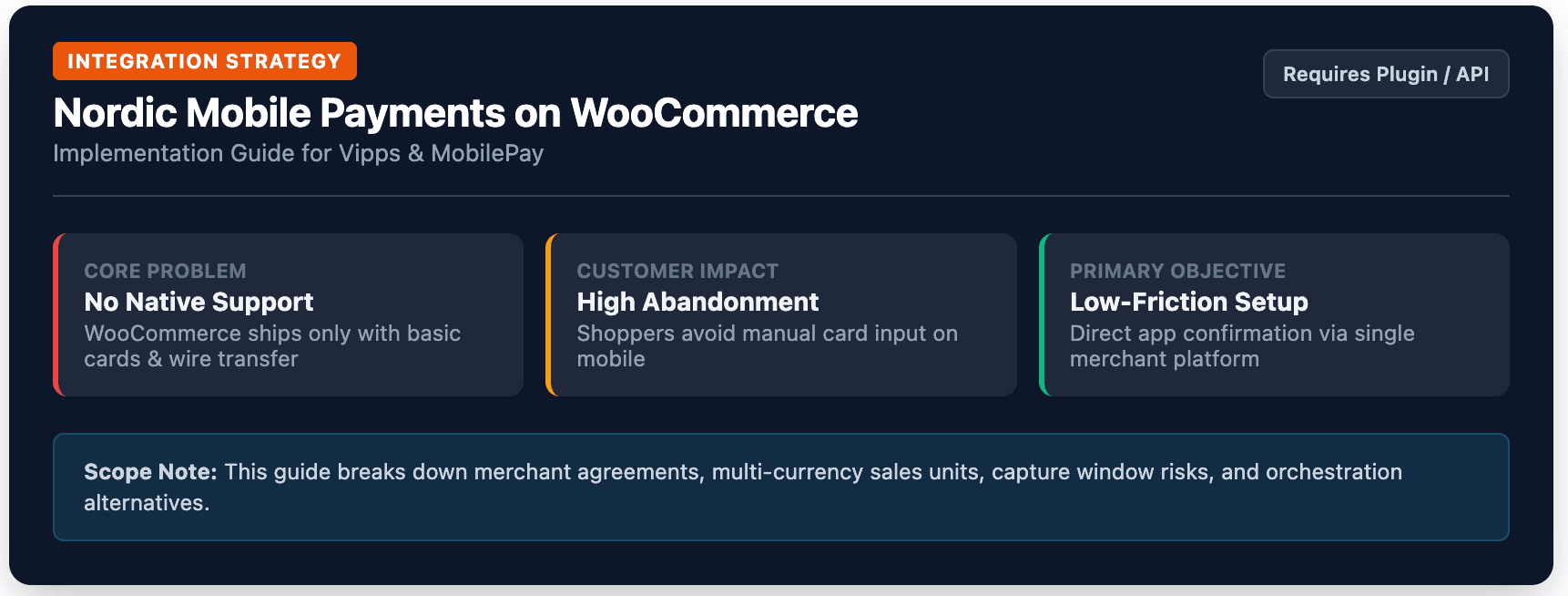
If you sell into Norway, Denmark, or Finland and your checkout does not offer Vipps or MobilePay, you are asking customers to pay in a way most of them actively try to avoid. These two apps are not niche add-ons in the Nordics. They are the default way a large share of the population pays for things online, and WooCommerce does not support either one out of the box.
This guide walks through what Vipps and MobilePay actually are, how to add both to a WooCommerce store, what the merchant agreement process involves, and the setup issues that trip up stores most often. It also covers where a checkout orchestration layer like Briqpay fits in, for merchants who want Vipps and MobilePay live alongside cards, invoice, and Swish without maintaining a separate plugin and a separate provider relationship for each one.
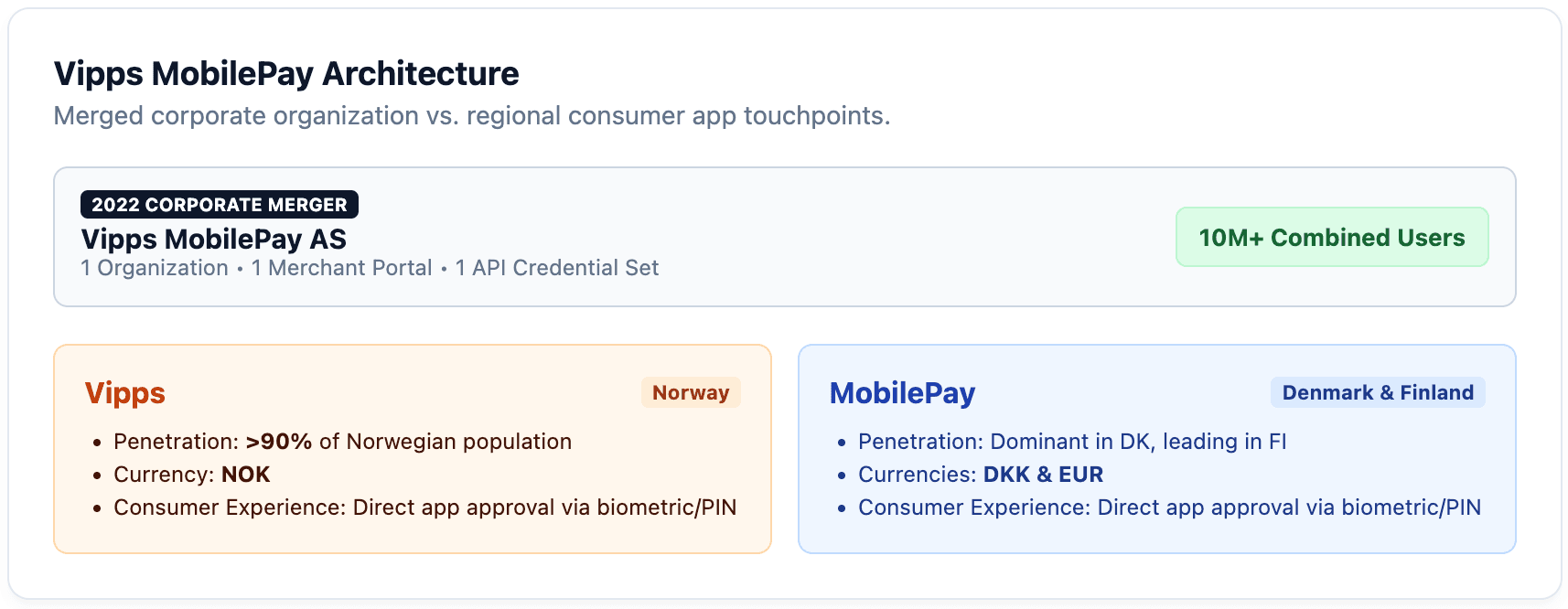
Vipps is Norway's mobile payment app. A customer scans a QR code or gets redirected to the app, confirms the payment with a fingerprint or face scan, and the order completes in a few seconds without typing in a card number. MobilePay is the equivalent app in Denmark, where it originated as a Danske Bank product, and it is also the dominant mobile payment method in Finland.
In 2022, Vipps AS and MobilePay merged into a single company, now operating as Vipps MobilePay. The underlying business is one organization with one merchant portal, but the two apps remain separate on the customer's phone: Norwegians open Vipps, Danes and Finns open MobilePay. For a merchant, that means you are dealing with one relationship and one set of API credentials, but you still need to think about Vipps and MobilePay as two distinct checkout experiences tied to two different currencies and, in most integrations, two different sales units.
Adoption is the reason this matters commercially. Vipps is used by well over 90% of Norway's population. MobilePay sits at a similarly high share of Danish shoppers, and it has become the leading mobile payment method in Finland too, even without the same historical head start. Independent Nordic central bank research puts total combined usage across the two apps in the tens of millions of users. A Norwegian, Danish, or Finnish customer who reaches your checkout and does not see their usual payment method is not a customer you can assume will find another way to pay. Many will simply leave.
Not natively. WooCommerce ships with support for standard cards, direct bank transfer, cheque, and cash on delivery. Vipps and MobilePay both work through their own APIs and redirect or app-based confirmation flows, so a WooCommerce store needs a payment gateway plugin built specifically for them, or a broader payment gateway or orchestration platform that includes them as one of its supported methods.
The good news is that the official plugin is well maintained and free to install. The less good news is that installing it is only step one. The merchant agreement, currency setup, and testing steps around it are where most stores lose time.
There are three realistic routes.
The first is the official "Pay with Vipps and MobilePay for WooCommerce" plugin, maintained directly by Vipps MobilePay. It is free, has more than 5,000 active installs, and holds a 4.8 out of 5 rating on WordPress.org. This is the direct route: you sign your own merchant agreement, hold your own API credentials, and install one plugin that handles both brands.
The second is a broader payment gateway that already includes Vipps and MobilePay among the methods it processes, such as Adyen, Nets, or Mollie. This can make sense if you already route other payment methods through one of these providers and want Vipps and MobilePay added to the same contract instead of a separate one.
The third is a checkout orchestration layer, such as Briqpay, that sits in front of whichever processor you use and lets you turn Vipps, MobilePay, Swish, cards, and invoice on or off per market from one configuration, without a separate plugin install or a separate frontend integration for each new method. We cover this option in more detail below.
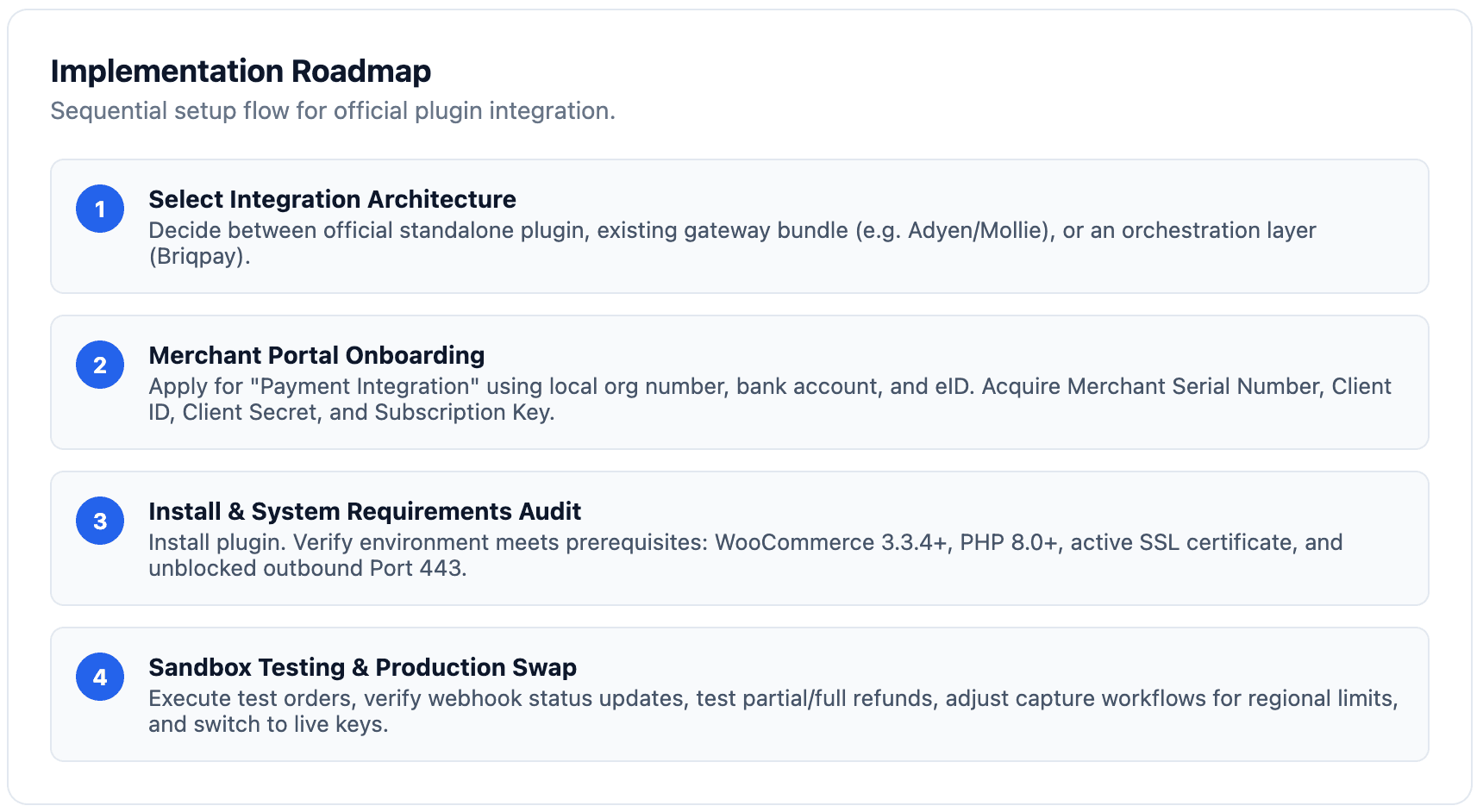
For a store adding Vipps and MobilePay for the first time with no existing payment infrastructure to work around, the official plugin is the simplest place to start. It is what the rest of this guide walks through.
Before any plugin can process a real payment, you need an approved merchant agreement. Sign up for "Payment Integration" at the Vipps MobilePay business portal. To be eligible, your business needs a valid organization number in Norway, Denmark, or Finland, a business bank account in that same country, and electronic ID to sign the agreement.
The application goes through verification and a risk evaluation before it is approved, so submit it early. You do not have to wait for approval to start building: Vipps MobilePay lets you begin integration work with test environment credentials while the application is being processed. Once approved, you receive a sales unit, a six digit Merchant Serial Number, and the API credentials you will need for the plugin: a Client ID, a Client Secret, and an Ocp-Apim-Subscription-Key.
One detail worth planning around: Norway, Denmark, and Finland do not share a currency, so if you sell into more than one of these markets you will typically be working with a separate sales unit per market instead of a single one covering all three.
With an approved agreement and credentials in hand, install the plugin.
Use your test environment credentials to run through a full purchase, from product page to order confirmation, exactly as a customer would. Confirm the order status updates correctly in WooCommerce once the test payment is confirmed, and check that refunds and cancellations behave as expected from the WooCommerce order screen.
Pay particular attention to one operational detail that catches merchants off guard after launch: capture windows differ by market. A Vipps payment in Norway can stay reserved and be captured for up to 180 days. A MobilePay payment in Denmark or Finland must be captured within 14 days, or the reservation expires and the customer is never charged. If your fulfillment process involves backorders, pre-orders, or manual capture on shipment, build your operational workflow around the 14 day window for Denmark and Finland specifically, not the more forgiving Norwegian one.
Once testing checks out, switch the plugin from test to production credentials and you are live.
| Approach | Best for | Trade-off |
|---|---|---|
| Official Vipps/MobilePay plugin | Stores adding Vipps and MobilePay as their first or only alternative payment method | You hold and maintain your own merchant agreement and API credentials directly |
| Payment gateway with Vipps/MobilePay included (Adyen, Nets, Mollie) | Stores already routing cards or other methods through one of these providers | Vipps and MobilePay setup is tied to that provider's broader contract and pricing |
| Checkout orchestration (Briqpay) | Stores that want Vipps, MobilePay, Swish, invoice, and cards live together and adjustable per market without new development | Vipps and MobilePay still run through an underlying processor; Briqpay unifies the configuration and checkout experience on top |
The official plugin is the right call if Vipps and MobilePay are the only payment methods you are adding. It gets more complicated the moment you also want Swish for Swedish customers, invoice for B2B buyers, and a couple of card acquirers, because each of those typically means another plugin, another set of credentials, and another thing to keep updated and monitor.
Briqpay approaches this differently. Instead of one plugin per payment method, a single Briqpay integration on WooCommerce gives you a checkout that can present Vipps to Norwegian customers, MobilePay to Danish and Finnish customers, Swish to Swedish customers, and cards or invoice everywhere, all configured from one place. New markets or new payment methods get added through configuration, not a new plugin install and a new frontend change, and merchants keep visibility over capture, refund, and order status from a single admin view instead of switching between gateway settings screens for each method.
For a merchant already committed to Vipps and MobilePay as a standalone project, the official plugin covers it well. For a merchant thinking about the next two or three payment methods they will need to add after this one, it is worth looking at whether an orchestration layer saves the repeated integration work later.
Cards remain the most universal option and the one every WooCommerce store already has in some form, but they ask a Nordic customer to do something Vipps and MobilePay do not: type in a card number, an expiry date, and a security code on a phone screen. Vipps and MobilePay collapse that into a fingerprint or face scan inside an app the customer already has open constantly.
Swish plays a similar role in Sweden, and the three methods together (Vipps, MobilePay, and Swish) are close to a checklist for any merchant serious about the Nordic market. Bank transfer and invoice still matter, particularly for B2B buyers, but they are not a substitute for a fast, mobile confirmation flow at the point of an everyday consumer purchase. The methods are complementary, not competing, and the merchants who convert best in the Nordics tend to offer all of them instead of picking just one.
A missing or misconfigured SSL certificate is the single most common blocker, since both Vipps and MobilePay require it and the plugin will not process live payments without it. Outbound traffic on port 443 being blocked by a restrictive host firewall causes a similar failure and is easy to miss if you are not the one managing the server.
Mixing up test and production credentials after go-live is another frequent issue, usually surfacing as payments that appear to work in the admin but never actually charge a real customer. Currency mismatches show up for merchants selling into more than one Nordic market: Vipps expects NOK, and MobilePay expects DKK or EUR depending on the market, so a store configured with the wrong currency for a given sales unit will see payments fail at the confirmation step, not at checkout, which makes the cause harder to spot.
Finally, the capture window difference covered above catches merchants who set up their fulfillment process around one market's rules and then expand into the other. A Danish or Finnish order that sits uncaptured past 14 days simply expires, with no charge and no error message pointing back to the real cause.
Beyond adoption numbers, our own analysis of a year of Nordic checkout data found that Vipps and MobilePay payments complete at a consistently strong rate, comfortably ahead of methods that require typing in card details or a manual bank transfer. The same data showed Vipps and MobilePay baskets running meaningfully larger than Swish baskets on average, and checkout activity for both concentrated heavily in the early evening, the window when most Nordic shoppers are actually paying, not just browsing.
Put together, that is a strong argument for treating Vipps and MobilePay setup as a priority, not a later nice to have, if Norway, Denmark, or Finland make up any meaningful share of your traffic. The customers most likely to complete a purchase in the evening, on their phone, are also the ones most likely to abandon a checkout that does not offer the payment method they already have open.
Can WooCommerce accept Vipps and MobilePay payments? Not without a plugin. WooCommerce needs either the official Vipps/MobilePay plugin, a payment gateway that includes them, or an orchestration layer like Briqpay to process either method.
Do I need separate merchant agreements for Vipps and MobilePay? No. Since the 2022 merger, Vipps and MobilePay run under one company with one business portal and one merchant application, though you will typically set up a separate sales unit per market and currency.
What's the actual difference between Vipps and MobilePay? They are the same underlying company's products, presented as separate apps by market: Vipps in Norway, MobilePay in Denmark and Finland. Customers in each market use the app they already have installed.
Is the official WooCommerce plugin free? Yes. The plugin itself carries no license fee. You will pay Vipps MobilePay's standard transaction based pricing on the payments it processes, which varies by market, product line, and volume.
Can I add Vipps and MobilePay without maintaining a separate plugin for each new payment method I add later? Yes, through a checkout orchestration layer such as Briqpay, which lets you add Vipps, MobilePay, Swish, cards, and invoice from one integration and one configuration screen instead of a new plugin per method.
Adding Vipps and MobilePay to WooCommerce is not difficult, but it does involve more moving parts than installing a plugin and flipping a switch: a merchant agreement with its own approval process, currency and sales unit setup per market, and a capture window difference between Norway and Denmark or Finland that is easy to miss until it costs you an order. Get those right once, and you have removed one of the biggest reasons a Norwegian, Danish, or Finnish customer abandons a checkout.
If you are already thinking about which payment method comes after this one, whether that is Swish, invoice, or a card acquirer, it is worth looking at whether a checkout orchestration platform like Briqpay saves you from repeating this setup process from scratch each time.
Connect any payment provider. Optimize your payment flow. Scale without limitations - with Briqpay’s Payment Integration Platform.
